
This is the triggermap that I created during the Tuesday 12:30 - 1:30 session. We used our flickr accounts to tag a picture with the latitude and longitude of a particular place (I choose Stone Mountain) and then add a picture to that place. You can see it on the world map below. You could add pictures to many different places and have landmarks or geography lessons from any place in the world. What do you think?
Another site which is apparently simpler to use was also brought up by someone in the audience - www.communitywalk.com. It seems to do the same thing and has a little more map capability.
If anybody has used either one with success I would be very interested in comments!
Get your own Trippermap!
Showing posts with label Flickr. Show all posts
Showing posts with label Flickr. Show all posts
Tuesday, June 26, 2007

Friday, June 8, 2007
Flickr, del.icio.us simple usage
Next week I teach a class on digital video and we begin working with Movie Maker so that everybody can see the free software that comes with Windows. We move on to other programs but we begin with Movie Maker. I went over to Flickr and added a bunch of photos over to my del.icio.us folder. Now if I have any students who don't have pictures to bring in, or just want to use other pictures they can use the ones that I have in my folder. I don't have to worry about the students seeing a picture that is not acceptable, I choose all the pics. Worked out pretty well for me, I am glad that I was able to use the tools. Simple use but helpful!
Thursday, June 7, 2007
Flickr image
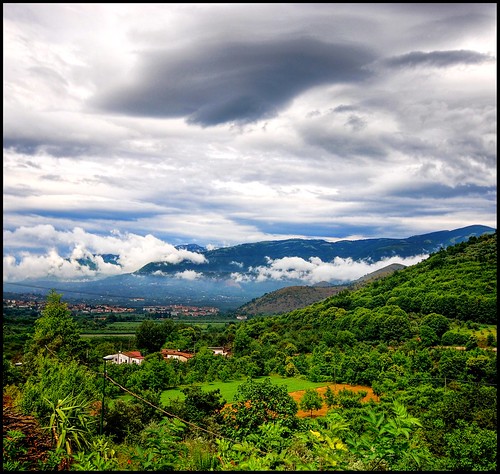
This is an image that I brought over from my new Flickr account. In looking at this picture I am trying to think about all the different things I could do with it in the classroom.
1. A discussion on the cloud types
2. Perhaps on farming
3. Different landforms
4. Types of trees and bushes
5. Maybe even do a "where in the world" segment and see if we can't figure out where this picture has been taken because of the
details in the picture
Certainly you could have a picture of the day if you have a journal writing class or just as something that you start your day off with. Flickr has a different picture for each day section so you don't have to look too far to find it! You would want to do this search before the class is in the room however. It is after all a place where people put up pictures of anything they want! Be sure to check it out BEFORE it goes on the big screen for the whole class! :-)
If you are interested, here is the link to the picture: http://farm2.static.flickr.com/1044/534232058_bb781ef022.jpg
Wednesday, June 6, 2007
Flickr uses
So, I just finished reading ch 7 of our book (which is written by WIll Richardson, you can check out his blog here) about Flickr. As I begun the chapter, I was thinking what am I going to use a picture editor for in the classroom? Now that I have finished, wow there are a lot of uses! The idea of annotation over pictures is great. Have pictures from a place of study (or find them on the web) and highlight what it is that I am looking at. Put little known facts about the Eiffel Tower or measurements of Mount Everest. How about a map that has all the states and capitals so when you roll over the area it tells you which is which? There are quite a few Social Studies uses, which of course roll into English uses when you think about it (since after all they will be writing these annotations). Pictures of Art and discussions of what you see and how it makes you feel.
I would love to hear any other uses that people are coming up with and how they might use it in a classroom.
I can just see it now, the new Rorshack test will be looking at inkblots on-line and telling the virtual therapist what you see! :-)
I would love to hear any other uses that people are coming up with and how they might use it in a classroom.
I can just see it now, the new Rorshack test will be looking at inkblots on-line and telling the virtual therapist what you see! :-)
Subscribe to:
Posts (Atom)
